VisualStudioソリューションファイルのコンテキストメニュー

会社のPCにVisualStudio2008とVisualStudio2010を入れていますが、今のところ問題なさそうです。
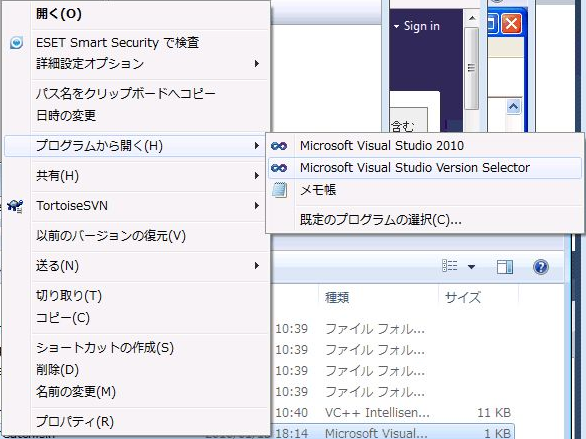
以前にVisualStudio2008で作成したプログラムを開こうとしたときに、普通はダブルクリックしてしまうのですが、何の気なしにソリューションファイルを右クリックしたところ、こんなメニューが表示されました。
「Microsoft Visual Studio Version Selector」って初めて見ました。
ちょっと選択してみましたが、、、、
何も表示されません。
と思ったら、
いきなりVisualStudio2008でソリューションファイルが開かれました。
これってすごく便利ですよ!!

コメントを残す

メールアドレスが公開されることはありません。 が付いている欄は必須項目です

このサイトはスパムを低減するために Akismet を使っています。コメントデータの処理方法の詳細はこちらをご覧ください

This website stores cookies on your computer. These cookies are used to provide a more personalized experience and to track your whereabouts around our website in compliance with the European General Data Protection Regulation. If you decide to to opt-out of any future tracking, a cookie will be setup in your browser to remember this choice for one year.
Accept or Deny